24/10/2025 9:45 am
Topic starter
Community
Connect with us and enhance your M-Files experience using Extension Kit for M-Files. Here is how to get started.

Notifications
Clear all
0

Want to create a validation rule to compare CustomerNo from a vault search with PhoneNo in the trigger source (it is not allowed to use PhoneNo on the trigger source if there already is an existing Customer with that number as CustomerNo).
Have the trigger source and the vault search in place.
It is not quite clear whether I should use CustomerNo as property and PhoneNo as Value or vice versa in the Property Validation rule?
In other words: Is "Property Validation rules> 'rule name' > Property condition > Property" always something on the triggering source, or is it from the vault search if you have configured a search?
2 Answers
0
24/10/2025 1:17 pm

Hi @karl-lausten,
In the Validation module, when using Advanced Configuration mode, you can choose whether to set a condition on:
-
the source property,
-
a property on an object found via Vault Search,
-
properties on specified objects, or
-
properties from a reference.
You can find all the available options in the Value from field:
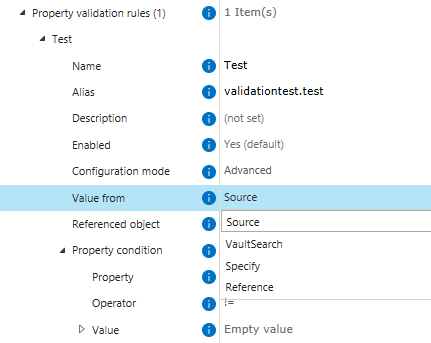
Dynamic values used in the condition are taken from the same object as the property being checked, which is where the configuration can become a bit tricky. There are two ways to set this up with similar logic: one uses Vault Search, and the other uses the Specify option.
Since you’ve already configured the Vault Search, let me guide you through the rest. Besides searching, Vault Search can also act as an additional filter that allows a rule to execute only if the search returns results:

If you configure Vault Search to find Customer objects with the same CustomerNo and set the Search result type to Any (the default), the rest of the rule will execute only if objects matching the criteria exist in the vault. In your case, the rule will execute only if there is at least one object with a CustomerNo matching the PhoneNo on your trigger source. If no such objects exist, the rule will not execute — which is fine, since we don’t expect an error message in that scenario.
If there is at least one matching object, the rule continues, and we already know an error message should appear. To trigger the message every time in this situation, you can configure an always-false condition. For example, setting the condition that CustomerNo must be empty will always evaluate to false, causing the error message to appear:
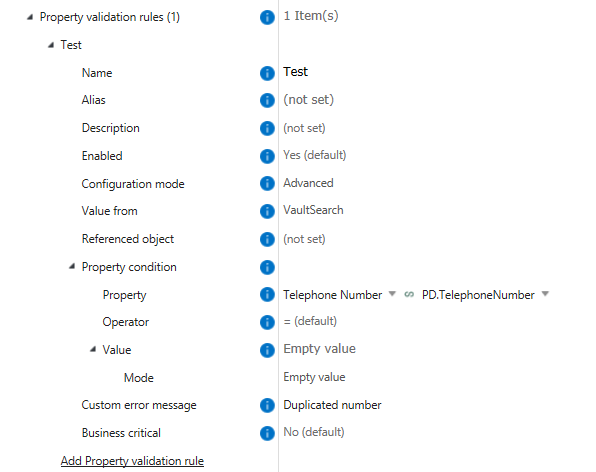
The Specify option works similarly and can be slightly faster for larger vaults. Using Static and Dynamic search filters, it goes through the Vault to find any Customer objects with the same PhoneNo. If no objects are found, Specify returns an empty value, which can be used in a Property condition to define that CustomerNo must be empty. If Specify finds results, CustomerNo is not empty, and the pop-up message will appear.

Both approaches will solve your use case. If you have additional questions or need further guidance during configuration, please let me know!
Best regards,
Nika
0
24/10/2025 3:29 pm
Topic starter
Thank you for a long and detailed explanation. I guess it boils down to this:
"Property Validation rules> 'rule name' > Property condition > Property" always refers to the selection you made in "Value From",
and
"Property Validation rules> 'rule name' > Property condition > Value" always refer to the trigger object.
Nika Tilic 27/10/2025 7:52 am
This post was modified 3 months ago by Nika Tilic
@karl-lausten no problem! 😊 It actually comes down to this:
-
Property Validation Rules > 'Rule Name' > Property Condition > Property - always refers to the selection you made in "Value From", and
-
Property Validation Rules > 'Rule Name' > Property Condition > Value - also refers to the selection you made in "Value From".
That’s why the configuration becomes a bit more complex if you want to compare the value from the trigger with values from other sources, such as Vault Search or Specify.
Best regards,
Nika
 Karl Lausten Topic starter
27/10/2025 8:22 am
Karl Lausten Topic starter
27/10/2025 8:22 am
Thank you for the clarification. Yes, that certainly makes it more complex. It also reveals potential for further development of your solution. I imagine others might have similar needs in some cases. But for now it would help to be very clear about this in the documentation.