09/10/2025 6:53 am
Topic starter
Community
Connect with us and enhance your M-Files experience using Extension Kit for M-Files. Here is how to get started.

Notifications
Clear all
0

Hello everyone.
I have an interesting challenge from our customer, and i would like to solve it with use of extension kit.
Customer have multiple internal document types that must be signed on different levels by dynamic number of signers. This in one example only.
Project documentation wrapper document:
Source of document is customers internal software, they use some kind of templates to generate word/pdf documents. Approvals are on multiple levels one after another in specific order (project owners, project planners, project specialist, project control…) Each level has one or more people assigned, that’s why we need to use separate assignments in m-files workflow. Each persons signature placement is defined with placeholder in document, something like ##Signature_<username>##. Signature should be added to document after each person approves the assignment or after all people in separate assignment approve task and source document is moved to next state.
On placeholder location there would be text with assigned employee name, followed by employees signature image under (related/referenced object on Employee object) of the user that actually approved assignment (can be different in case of substitution).
Could you please check if this scenario is possible with extension kit configuration and how, so we can forward the information to customer.
Thanks everyone for help and best regards.
Blaž
2 Answers
0
13/10/2025 8:31 am

Thanks for reaching out. Configuring this case isn’t simple, but our team enjoys solving a good challenge — we’ll get it working.
For this solution you’ll need:
- A Property Operation rule that transfers the information about the user who completed the assignment to the Document that generated the assignment.
- A Property Operation rule that finds the Employee object that corresponds to the above user account.
- A Document Processing rule that inserts signatures and dates into the document.
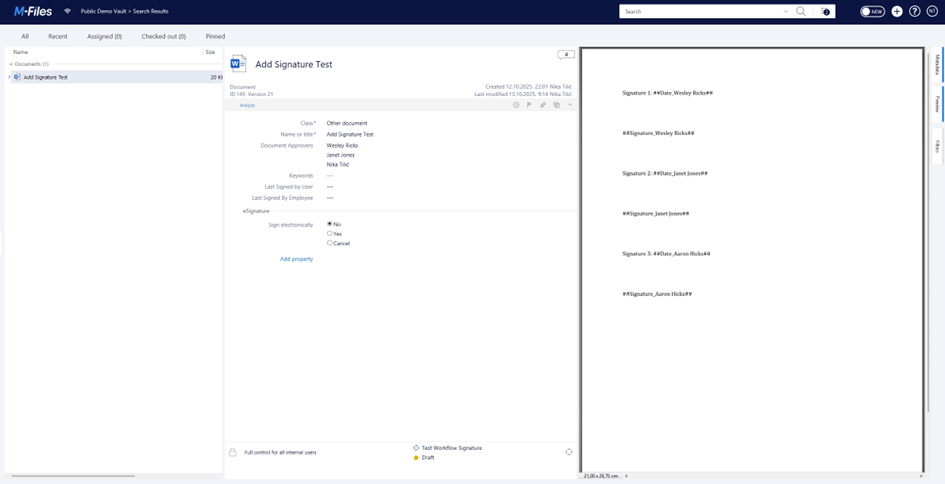
Let’s start at the beginning. The document in the screenshot below contains placeholders (some are plain text, some are created with the M-Files mapping feature so you can see the rule works both ways). The metadata card contains the Document Approvers property used to assign the document via the Workflow state action. Last Signed by User and Last Signed by Employee are technical properties that can be hidden from the metadata card - end users don’t need to see them. Their only purpose is to trigger rules and pass information from the assignment object to the document object.
Since the assignment object works with users (value list) and not employees (lookup), the first rule must detect which user marked the assignment as completed. When a user marks an assignment completed, they are automatically added to the built-in multi-select property Marked completed by. To detect which user was added most recently, use the AddedItem function (found under the Lookup function group added to the Property Operation module in our last release). Note: for this case you’ll need Extension Kit Core 25.10.0 or later. Below is the configuration of that rule:
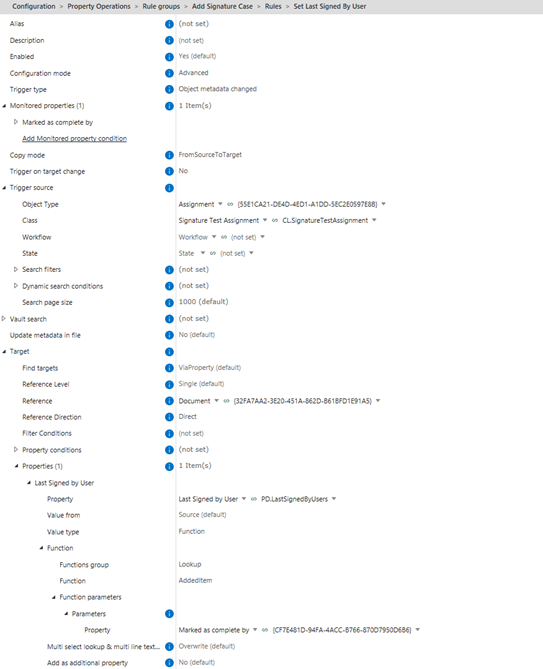
After this rule runs, Last Signed by User is populated with the name of the last user who marked the assignment completed. Because the Document Processing rule needs an Employee object to fetch the signature image, we then need to find the employee with that user under PD M-Files Account. To do that, add a second Property Operation rule that triggers on changes to Last Signed by User:
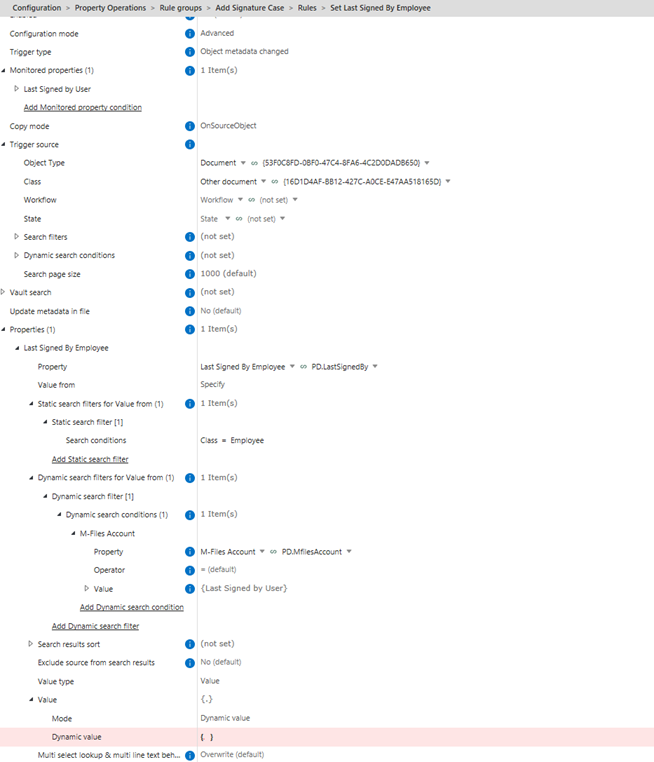
The result of those two rules is shown here:
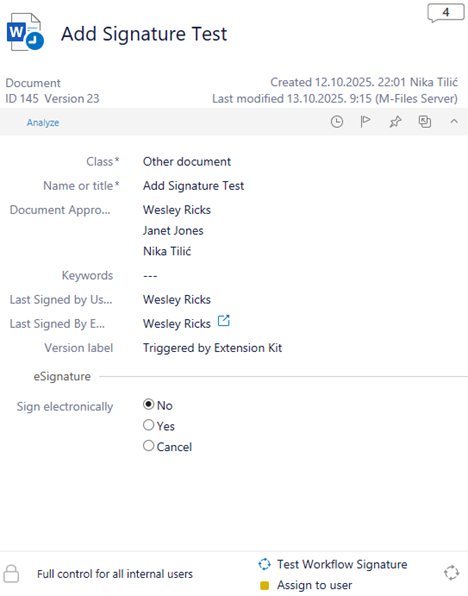
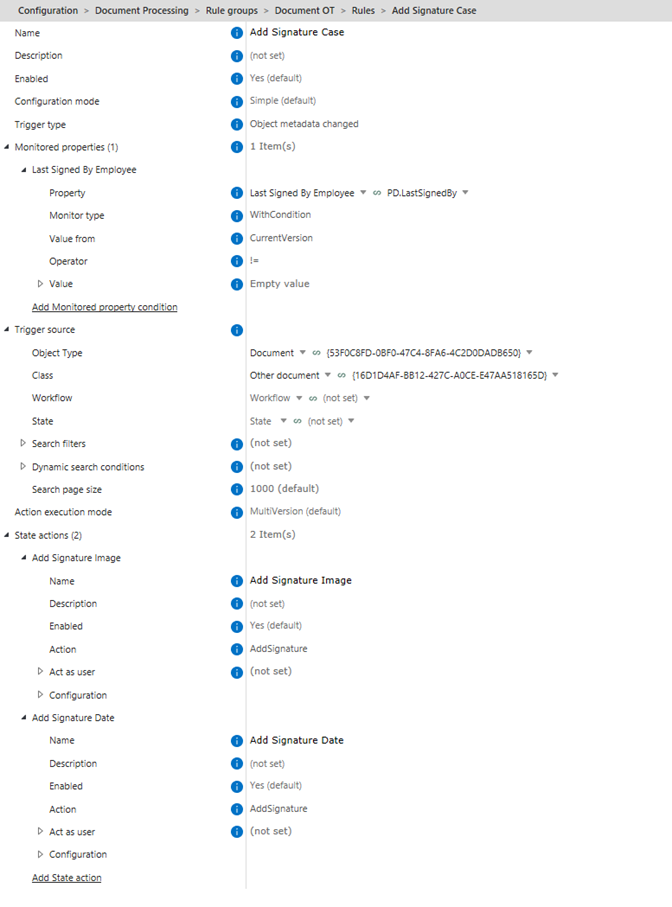
Finally, configure the Document Processing rule. You’ll need two State actions: one to insert the signature image dynamically and another to add the date into the date placeholder. Trigger this rule on changes to Last Signed by Employee:
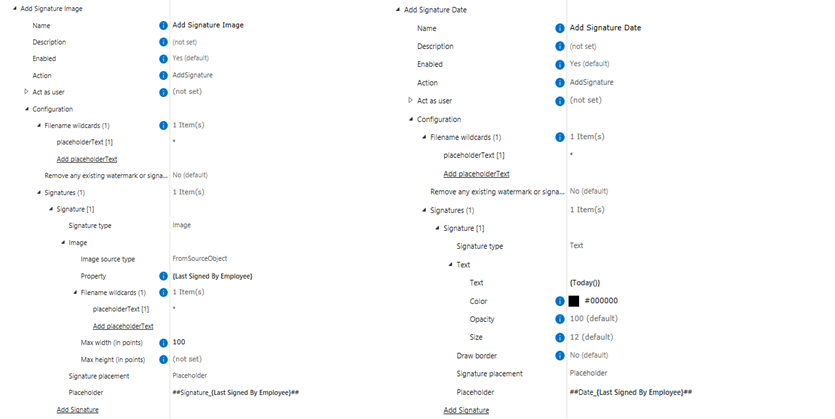
Here are the configurations of both state actions:
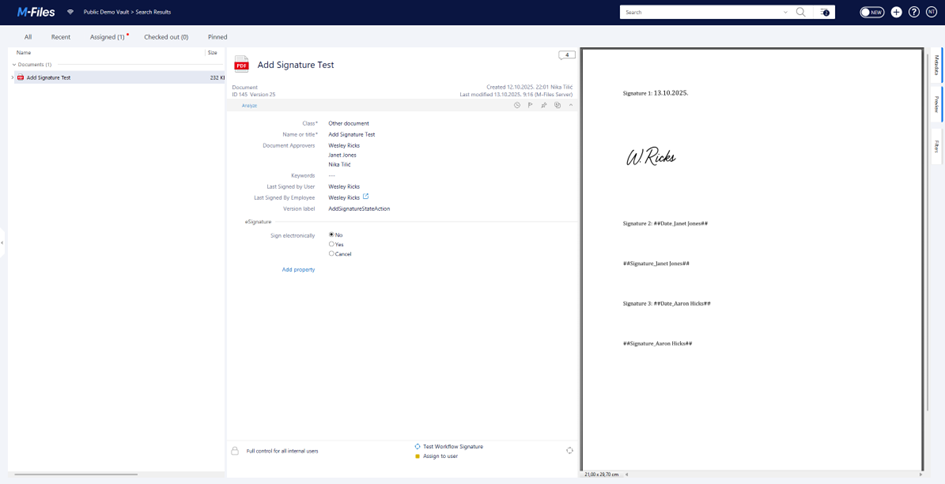
Once Last Signed by Employee is populated, the Document Processing rule runs and the signatures are inserted into the document:
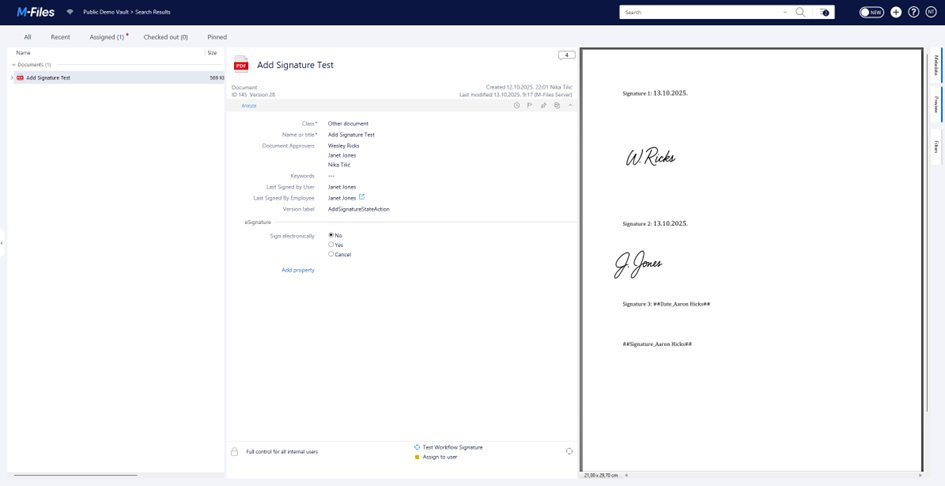
The same cycle repeats each time an assignment is marked completed by a user:
I walked through the case in detail so you can study each step line-by-line. Attached are the JSONs for the rules described above:
I hope the suggested solution works for you - if you have any questions, feel free to reach out.
Best regards,
Nika
This post was modified 2 months ago 2 times by Nika Tilic
0
27/11/2025 8:33 am
Topic starter
Hello,
@nikatilic thank you for your assistance, i was able to set up signatures as required. Since there are multiple levels of approvals with multiple people, i had to set up multiple rules for each separate task as well and that works as expected.
Now there is another challenge. Deleting all signatures from specific set of approvals in case that someone rejects document (for instance all signatures added by approvers 2 need to be delete, but signatures from approvers 1 need to stay). I did not find a configuration to delete multiple signatures at once. Maybe another option would be to find original document from history (defining filters with metadata and greatest version number if multiple version found matching filter). Is anything like this possible with Extension Kit?
Best regards,
Blaž