Extend AI capabilities in M-Files
without coding
Use AI to classify documents, extract metadata, create related objects, route workflows, and generate new documents directly in M-Files through configurable rules.
Turn AI output into M-Files action
Customers want to use AI in M-Files to reduce manual work, speed up document handling, and improve metadata quality.
But once M-Files is connected to an AI model, the next question is what happens with the AI output:
- Can documents be classified automatically when they enter M-Files?
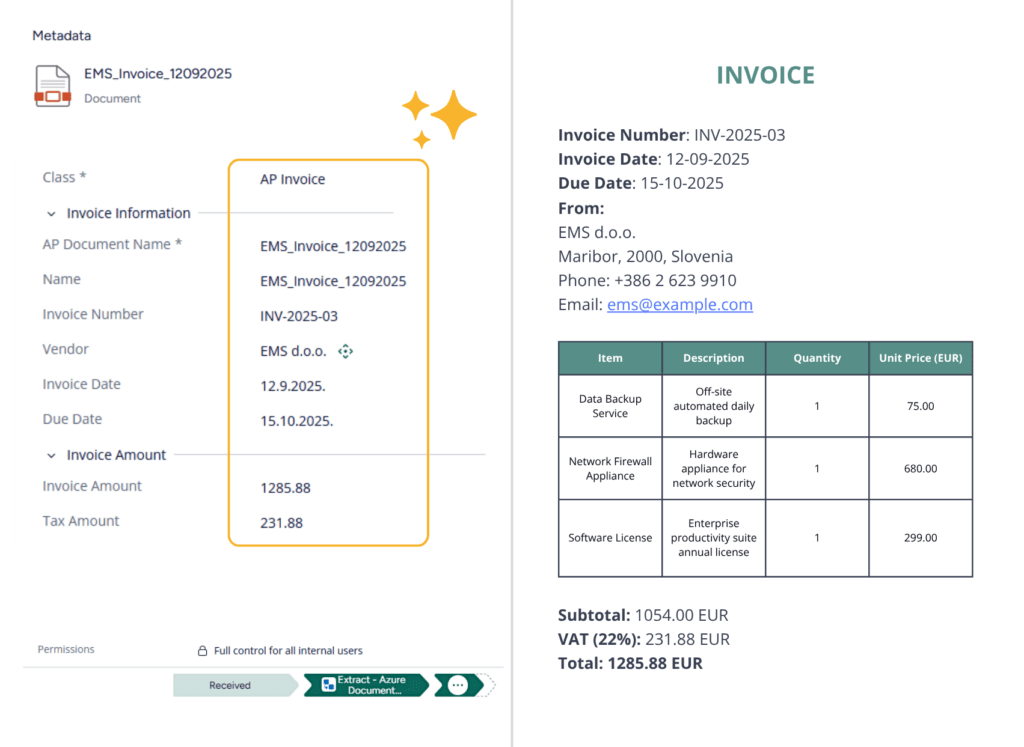
- Can invoice header data and line items be extracted into metadata?
- Can AI results route documents to the right workflow?
- Can M-Files connect to the customer’s own AI service?
The real value comes when AI is connected to the M-Files process, so its output can update metadata, create related objects, route documents, or trigger the next workflow step.
That way, AI doesn’t just provide information — it helps move work forward.
Build AI-powered M-Files solutions without coding
Extension Kit Core provides a configurable way to bring AI into real document processes — using the Document AI module for classification and data extraction, or HTTP Integration for custom AI connections and document creation scenarios.
Classify documents when they are imported in M-Files. Classification results can be used to assign the right document class, apply metadata, or route the object into the correct workflow.
Extract structured data from invoices, contracts, forms, ID documents, and other documents (including header-level data and line items), then map the results to M-Files properties.
Send content or metadata to an external AI service, receive a structured response, and use that response to generate or populate a new document in M-Files.
Use extracted values and classification results to update metadata, change workflow states, create related objects, or trigger additional actions inside M-Files.
Connect M-Files to external AI services, custom agents, customer-hosted AI platforms, or local LLMs exposed through a web API.
With Extension Kit Core, AI output becomes actionable inside M-Files, so the process moves forward without unnecessary manual handling.
Flexible solutions, faster delivery
Use cases
Extract supplier, invoice date, due date, totals, and line item data from invoices. Use the returned structured data to update the invoice object and create related line item objects in M-Files.
Classify documents automatically when they enter M-Files, then use the result to apply the correct metadata and set workflow states. For example, an incoming invoice can be classified, enriched with extracted metadata, and moved into the appropriate invoice workflow automatically.
Connect M-Files to external AI services or custom agents through HTTP Integration, then use the AI response to create new documents in M-Files. Generated outputs such as summaries, reports, notes, or drafts can be stored as governed M-Files documents with the correct class, metadata, and relationships.
For PDFs containing multiple invoices or document sections, use AI to identify where the document should be split. Store the split information in M-Files, use the Document Processing module to create separate documents, and then run Document AI on each newly created file.
Ready to simplify your next M-Files implementation?
Empower your M-Files implementation and cut development time and cost with Extension Kit for M-Files - low-code/no-code solutions that accelerate deployment, simplify configuration, and deliver advanced features.
From extraction to generation:
Extend AI scenarios in M-Files without coding
Learn how to connect M-Files to external AI services without coding, and automatically analyze documents,
extract structured data, and generate new objects directly in M-Files.