02/06/2026 12:18 pm
Topic starter
Community
Connect with us and enhance your M-Files experience using Extension Kit for M-Files. Here is how to get started.

Notifications
Clear all
0

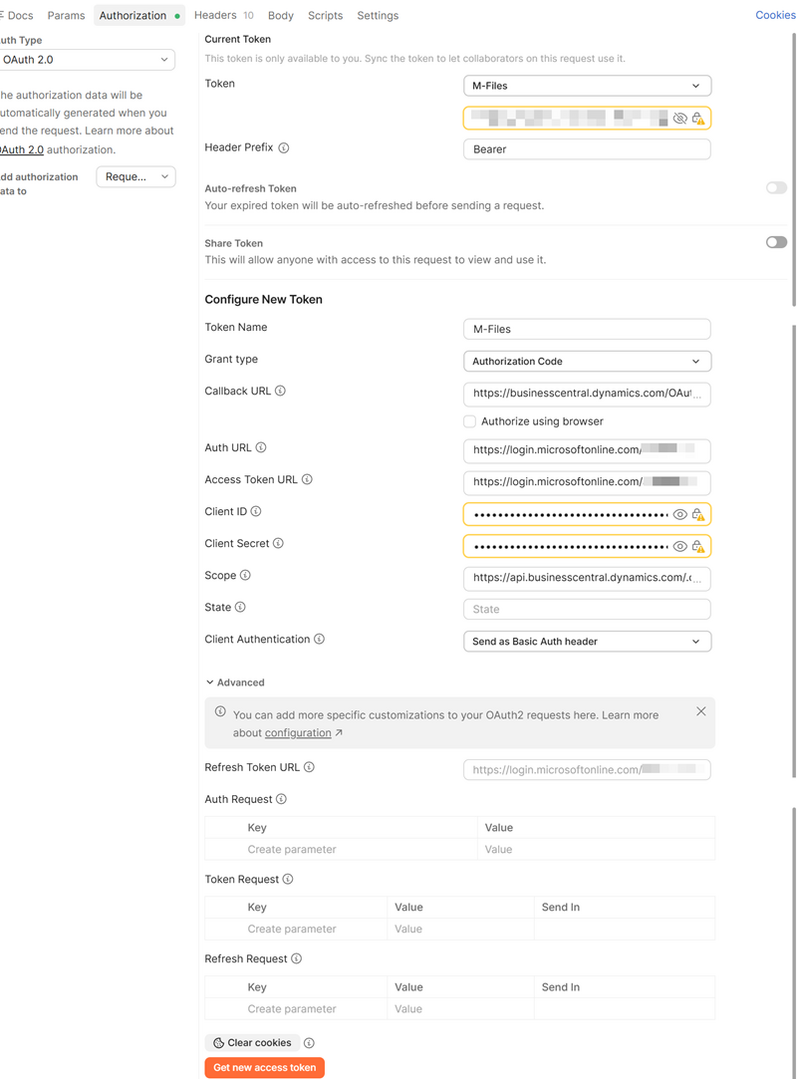
Getting access to the BC API we need to provide a bearer token for Authorization. It can be created in Postman, Authorization, Auth Type "OAuth 2.0" using a URL like this https://login.microsoftonline.com/{tenant id}/oauth2/v2.0/authorize while providing the Client ID and Client Secret. The challenge is that this token is only valid for a short period (a couple of days I believe). Therefor I need to configure a process that retrieves a fresh token on regular intervals and saves it to a property in M-Files. That should enable the use of the same property for dynamic insertion of the valid token in the header of any regular POST or GET operation.
It can be operated on a schedule, but I am not quite sure how to configure the "get a fresh bearer token" process. It does not seem to be a regular "GET" operation. Any suggestions on how to do this part?
The screenshot is from Postman.

08/06/2026 10:32 am
This post was modified 5 months ago by Nika Tilic
Hi Karl,
I'm sorry for the delayed response.
I checked the Business Central documentation and it appears that you need to make a POST request to obtain an access token before sending requests to the Business Central API. Regardless of whether you are using scheduled or triggered rules, the recommended approach would be to use the Orchestration module to first execute a rule that retrieves the token, save the token to a property, and then use that property in the subsequent rule that retrieves data from Business Central.
You can find the relevant POST request example in the Microsoft documentation:
Business Central Administration Center API - Business Central | Microsoft Learn
If you need any further assistance with the configuration, please let me know.
Best regards,
Nika
5 Answers
0
11/06/2026 8:47 am
Topic starter
Hi Niika,
I wrote the initial question before I had worked my way down to all of the details regarding authorization in the Ext.Kit manual. It turns out that you can in fact configure Credentials on a Rule Group level and then use the "FromGroup" option as Credentials Source. I have tested this, and I can see that the HTTP module automatically gets a fresh token for every HTTP action, and that this new token is inserted as an Authorization header in the request.
However, the BC server still rejects the request as unauthorized.
I have gone through my configuration several times without finding anything that should cause an "unauthorized" response. So I start wondering if it could be that the request is send too soon after getting the new token meaning that the BC server has not yet registered the new token as legitimate. Would that at all be possible? And if yes, are there any method to insert a short delay between requesting the new token and actually using it?
0
11/06/2026 9:57 am
Topic starter
Digging further into the logs it seems like the tokens generated by Ext.Kit are 1687 characters long whereas tokens generated in PostMan are 2097-2099 characters long. The first 1724 characters are identical in all Postman-tokens, but only the first 330 characters are identical in the Ext.Kit tokens. I guess that explains why the Ext.Kit tokens are rejected. Will dig into what might cause the difference.
0
11/06/2026 11:53 am
Topic starter
OK, found the difference.
In Postman you can select a range of different Grant Types: Authorization Code, Authorization Code (With PKCE), Implicit, Password Credentials, Client Credentials.
In Ext.Kit you can only select: Client Credentials or Password.
I had selected Authorization Code in Postman and Client Credentials in Ext.Kit - hence the different length of the tokens. If I select Client Credentials in Postman, I will get a token equivalent to the tokens from Ext.Kit, and the request is deemed unauthorized.
The optimal solution would be that Ext.Kit HTTP module is updated with options to select all of the Grant Types listed for PostMan. With that in place we should be able to simply configure Credentials on the Rule Group level and use it in all Rules in that group.
I will not need this for production until August this year. Hope you can find a way to include it in an update before that.
12/06/2026 11:18 am
Thank you for digging into this and identifying the root cause — that's a very helpful finding.
I've forwarded your request to our development team and discussed the grant type limitations with them. They've confirmed we should be able to add support for the additional OAuth grant types in time for your planned August production rollout. While I can't promise an exact release date yet, the feature is now on our roadmap 🙂
0
12/06/2026 11:29 am
Topic starter
Sounds good. Thank you
0
15/06/2026 11:01 am
Topic starter
I just had a look at Rest Object Type connector. It has the same lack of options for Grant Types with OAuth2.
Need this application as well for the same customer. Please update the Grant Type options in both applications, thank you.