11/05/2026 6:20 pm
Topic starter
Community
Connect with us and enhance your M-Files experience using Extension Kit for M-Files. Here is how to get started.

Notifications
Clear all
0

I see that Vault to Vault feature is no longer supported in signed version for M-Files Cloud. We plan on migrating to M-Files Cloud soon and utilize this feature. Is their plans to bring this back?
Thanks
Jeff
2 Answers
0
12/05/2026 6:43 am

Hi Jeff,
Vault to Vault feature is only available in older versions of our cloud solution. The last version that includes it is 25.5.1, and it can be downloaded here: Extension Kit Core Cloud Release History - Extension Kit for M-Files | Unitfly
Best regards,
Nika

Topic starter
04/06/2026 6:26 pm
@nikatilic I'm working on the transferring with SFTP and I can get the data to transfer. The one thing that I'm struggling on is I only want the one object/document to send to the SFTP. I have it set to Trigger type = Object entered state and Trigger source with Class and State filled out. Theory is when a document gets into a workflow state I want the file to be transfered.
Issue I'm having is how do I just export the one Object/Document that hit the workflow state? I have tried to use the Document=%.% but that doesn't seem to get any results. I can have it transfer all documents that are currently in that state but just wanting the one that triggers the event.
0
08/06/2026 6:50 am
Hi Jeff,
please try the following configuration:
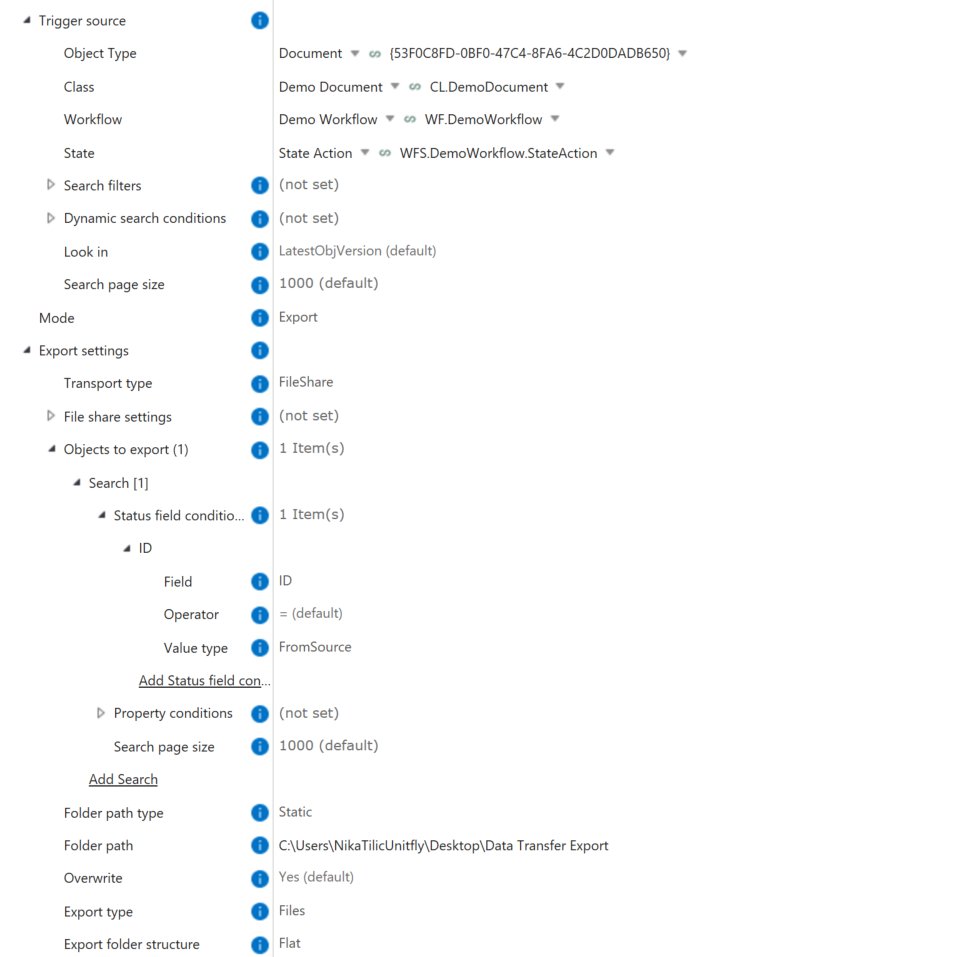
I tested it with the fileshare, and it should work with SFTP as well. If you need any additional instructions or run into any issues, please let me know.
Best regards,
Nika