📢 New on-demand webinar: Extend AI capabilities in M-Files without coding!  WATCH NOW

Extension Kit for M-Files | Unitfly
  • Solutions
  • Products
    • Extension Kit Core
    • Extension Kit Document AI
    • Extension Kit Cloud Connector
    • Extension Kit REST Object Type
    • Extension Kit Process Intelligence
  • Pricing
  • Resources
    • Learning
      • Insights
      • Extension Kit Core Expert Tips
      • Extension Kit Academy
      • Newsletters
    • Technical
      • Documentation
      • Release notes
      • Download center
      • Community
    • Get started
      • Free trial
      • Demo Vault
    • Get in touch
      • Professional services
      • Become a reseller
      • Request a demo
      • Contact us
  • Capabilities
    • Integrations and data sync
    • AI capabilities
    • Document automation and processing
    • Metadata and object automation
    • Reporting and insights
    • Workflow management
  • Products
    • Extension Kit Core
    • Extension Kit Document AI
    • Extension Kit Cloud Connector
    • Extension Kit REST Object Type
    • Extension Kit Process Intelligence
    • Auclio ↗
  • Pricing
  • Resellers
  • Resources
    • Learning
      • Insights
      • Expert tips
      • Extension Kit Academy
      • Subscribe to our newsletters
    • Technical
      • Documentation
      • Release notes
      • Download center
      • Community
    • Get started
      • Free trial
      • Demo Vault
    • Get in touch
      • Professional services
      • Become a reseller
      • Request a demo
      • Contact us
Get started free
Cloud Connector for Power Automate
  • Do more with M-Files

Extension Kit for M-Files | Documentation

Extension Kit Cloud Connector

  • Cloud Connector for Power Apps
  • Cloud Connector for Azure Logic Apps
  • Cloud Connector for Power Automate
View Categories
  • Home
  • Documentation
  • Extension Kit Cloud Connector
  • Extension Kit Cloud Connector
  • Cloud Connector for Power Automate

Cloud Connector for Power Automate

0:00 / 1:37
  • View as Markdown Open this page as plain Markdown (opens in a new tab)
  • Open in ChatGPT Ask questions about this page (opens in a new tab)
  • Open in Claude Ask questions about this page (opens in a new tab)
  • Open in Google AI Studio Ask questions about this page (Google account required) (opens in a new tab)

Import custom connector #

  1. Download connector OpenApi definition file from this link.
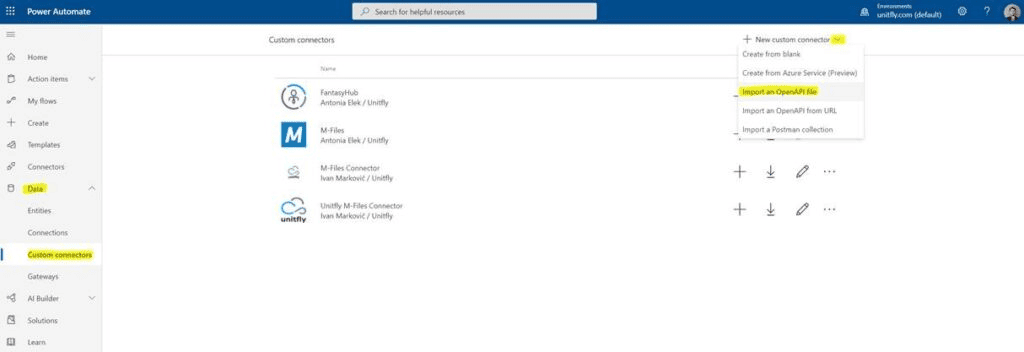
  2. Login to your Office 365 Power Automate account and click on Data -> Custom connectors.
  3. Click New custom connector -> Import an OpenAPI file.
  1. Define any custom Connector name.
  2. Click import and import the OpenAPI definition file you received from us.
  3. Click Continue.
  4. Click Create connector.

Define new connection for custom connector #

  1. Download connector license file from this link (it takes a few moments for the license to generate)
  2. Find entry titled Connection and click on Create.
  3. Go to Data -> Connections.
  4. Find newly created connector and click on it.
  5. In the field API Key paste API Key you received from us.

Create a new custom connector action #

  1. Create a flow that you want
  2. Click Add action
  3. Click tab Custom
  4. Select the action you want to create
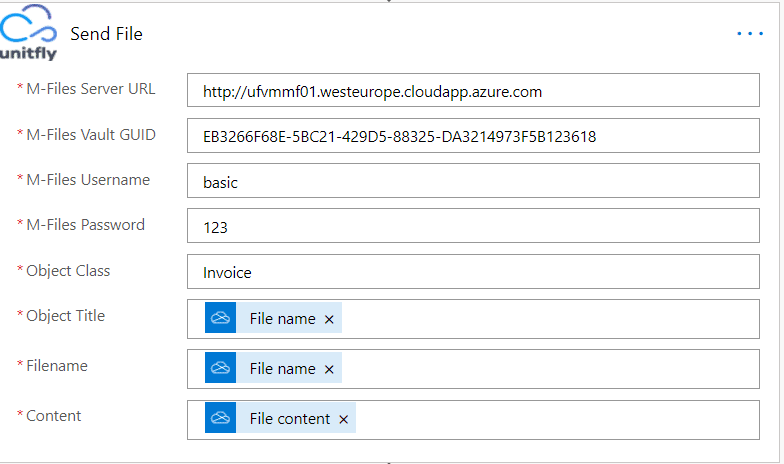
  5. Populate at least required fields (*)

Example of action “Send File” that creates new Invoice with dynamic name File name and content File content

Configuration #

Property Description
M-Files Server URL Needs to be in a format http(s)://yourmfilesendpoint.com
M-Files Vault GUID GUID of your M-Files vault without {}
M-Files Username Username of user that has rights to execute selected action
M-Files Password Password of user that has rights to execute selected action

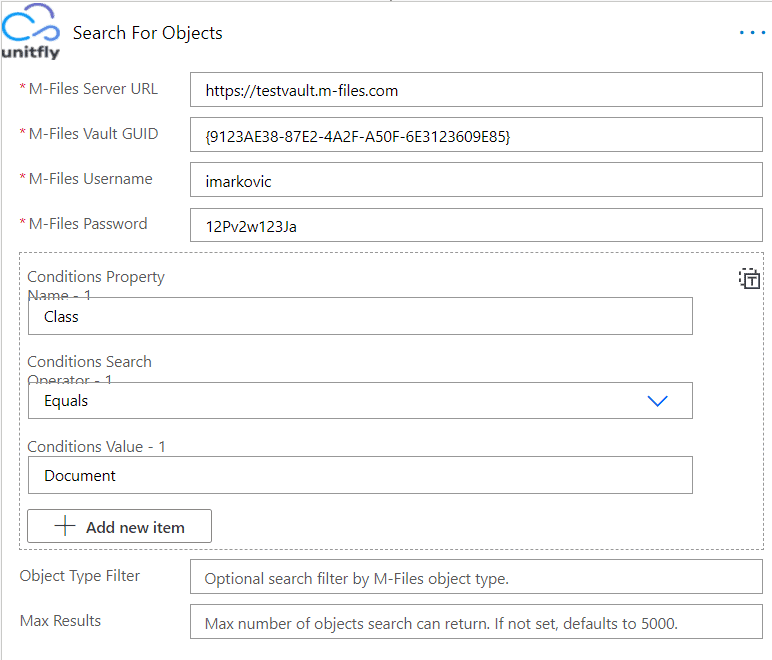
Example of action “Search for objects” that search for all objects where Class equals “Document”

Available actions

More details about actions – https://unitflymfilesapistg.azurewebsites.net/swagger/index.html

  • Execute M-Files Extension Method
  • List files from M-Files
  • Send file to M-Files
  • Search for files from M-Files
  • Get file from M-Files
  • List M-Files objects
  • Send object to M-Files
  • Search for M-Files objects
  • Get object from M-Files
  • Update object properties in M-Files
Updated on October 20, 2025
On This Page
  • Import custom connector
  • Define new connection for custom connector
  • Create a new custom connector action
  • Configuration
Extension Kit for M-Files | Unitfly
  • Solutions

Products

  • Extension Kit Core
  • Extension Kit Document AI
  • Extension Kit REST Object Type
  • Extension Kit Cloud Connector
  • Extension Kit Process Intelligence

Resources

  • Documentation
  • Insights
  • Extension Kit Academy
  • Release notes
  • Join the community
  • Contact support

Get started

  • Pricing
  • Free trial
  • Contact us
  • Download center

Get updates and tips on Unitfly products!

Select the lists you wish to subscribe to
  • Privacy & Cookie policy

© 2026 Extension Kit for M-Files by Unitfly