AI classification and data extraction are among the most practical ways to bring AI into document management.
When documents enter M-Files, AI can help identify document class and extract the information needed for metadata and further processing.
With Document AI in Extension Kit Core, you can expand existing AI capabilities in M-Files and configure how classification and extraction should work. Without custom development, you can connect M-Files with services such as Azure Document Intelligence and Microsoft Foundry, and bring AI-driven document classification, AI metadata extraction, and workflow automation directly into M-Files.
In this article, we focus on two practical scenarios for AI document processing in M-Files: AI-assisted classification and metadata extraction during document creation, and fully automated document intake with classification, extraction, and related object creation.
Use case 1: AI-assisted document classification and metadata extraction during document creation
When a user adds a document to M-Files, the system can automatically classify the document and extract relevant metadata based on the detected class. This helps reduce manual data entry and improves metadata consistency from the beginning of the document lifecycle.
Within the Document AI module, you can configure which AI service and model should be used, what information should be extracted, and how the extracted values should be mapped to M-Files metadata properties.
For example, when an invoice is added to M-Files, Document AI can identify it as an invoice and extract invoice-specific metadata, such as:
- Invoice number
- Supplier information
- Invoice date
- Due date
- Amounts
In this scenario, the data was extracted using a prebuilt invoice model in Azure Document Intelligence.
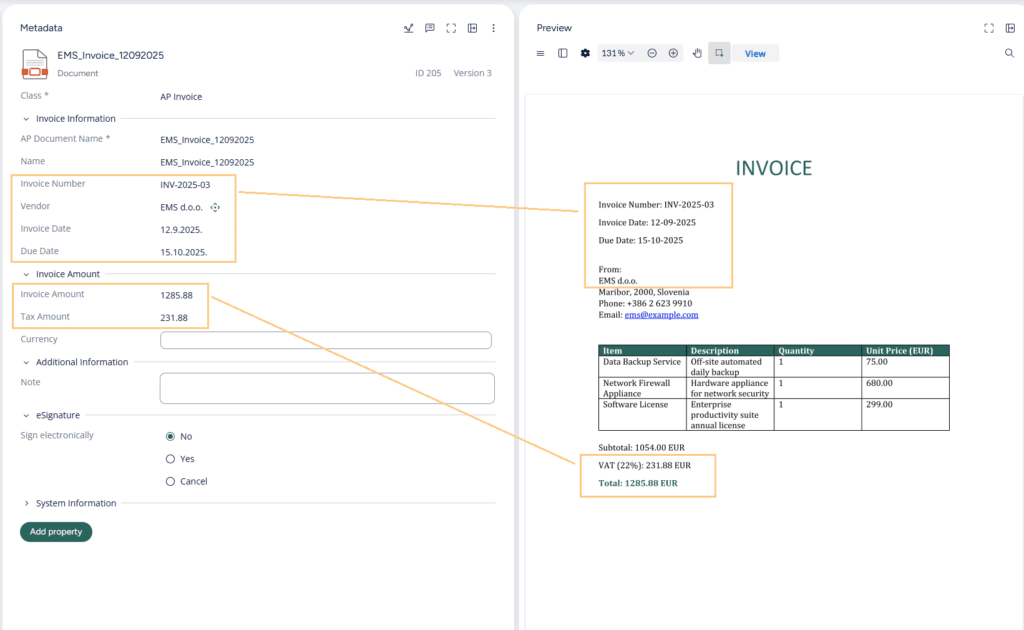
If the document is an identification document, a different set of metadata can be extracted. This means the extraction logic adapts to the document type, instead of applying the same generic process to every file.
Use case 2: Fully automated document intake, classification, workflow routing, and extraction
The second use case goes further by automating the intake process itself.
This scenario starts with documents being automatically added into M-Files through import folders, email attachments, or integrations with external systems, instead of being manually created by users.
At this point, the documents are still unclassified. From there, Extension Kit Core triggers a background processing workflow that classifies each document and determines what should happen next.
A typical automated flow can look like this:
- A document is imported into M-Files.
- The document is classified automatically.
- The correct workflow is assigned based on the detected document class.
- Metadata extraction is triggered automatically.
- Extracted values are mapped to M-Files metadata properties.
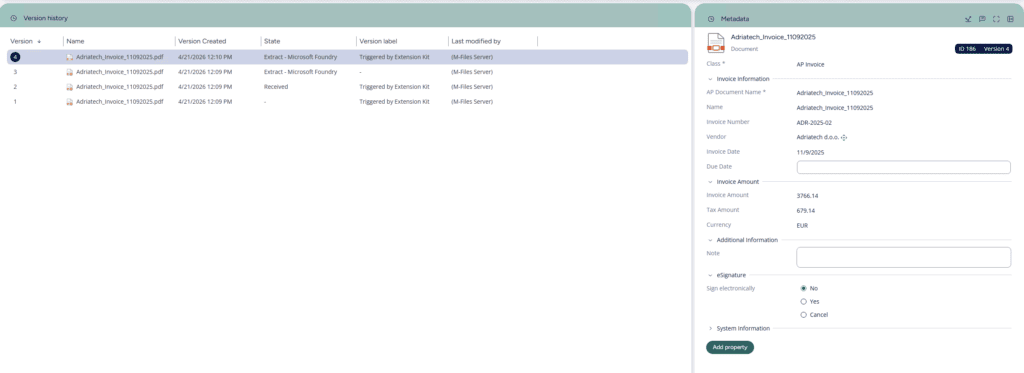
When different document types enter M-Files through the same intake channel — for example, an incoming invoice and an identification document may both arrive through an import folder — Document AI can classify each document, assign the right workflow, and trigger the correct extraction logic for that specific document type.
In this scenario, Azure Document Intelligence was used for classification, and Microsoft Foundry for extraction.
Extracting invoice line items into related M-Files objects
Invoice processing often requires more than header-level metadata.
For many organizations, invoice line items are important for approval processes, ERP integrations, reporting, or financial validation.
In this scenario, Document AI was used not only to extract invoice header metadata (invoice number, dates, or supplier information), but also to extract invoice line items and automatically created related line item objects inside M-Files.
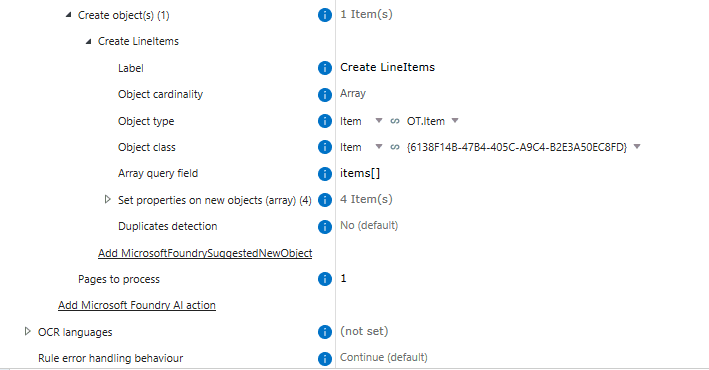
For example, the invoice contained three line items, so the workflow created three related line item objects in the background and linked them to the invoice document.
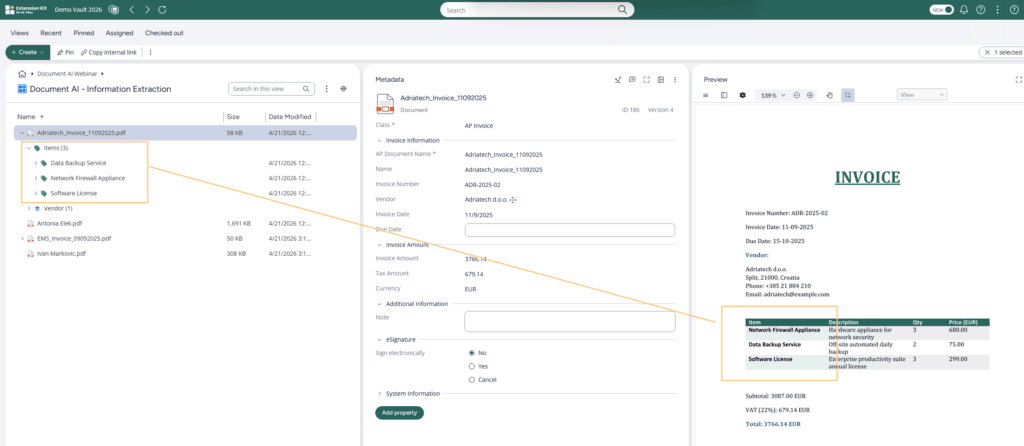
This was possible because the AI model returned structured JSON output, including arrays for line items. Extension Kit could then process that structured response and create the related M-Files objects.
This is an important step beyond basic AI invoice extraction. Instead of just capturing text, the workflow turns invoice details into structured data that can be used in M-Files. For teams handling large volumes of invoices, this helps create a more scalable invoice automation process in M-Files.
Flexible AI configuration in Extension Kit Core
These use cases are configured in the Document AI module of Extension Kit Core.
The goal is to define how documents should be processed once they enter M-Files — which AI service should handle them, what should be extracted, and how the results should be used in the M-Files workflow.
The configuration defines:
- Which documents should be sent for AI processing
- Which AI service should be used
- Which model should process the document
- Which action should be performed, such as classification or extraction
- Which fields should be extracted
- How extracted values should map to M-Files metadata properties
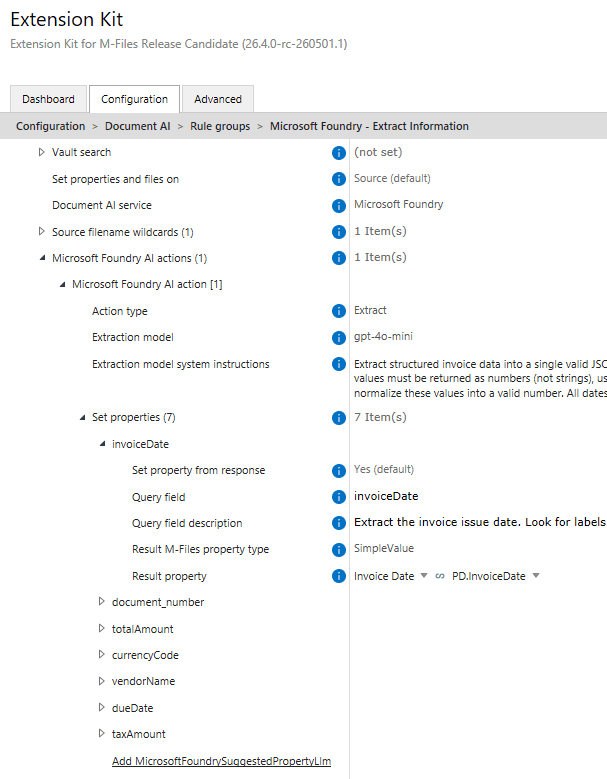
This gives you flexibility to adapt AI processing to different document types. For example, an invoice can use extraction settings focused on invoice numbers, dates, suppliers, amounts, and line items, while an identification document can use a different setup for names, identification numbers, and issuing institutions.
This flexibility also applies to the AI services behind the workflow. In this scenario, Azure Document Intelligence was used for classification, while Microsoft Foundry was used for metadata extraction. Depending on the use case, teams can choose the service or model that best fits each step, while keeping the workflow logic centralized inside M-Files. For scenarios that involve custom AI services, internally hosted models, or locally deployed LLMs, the HTTP Integration capabilities can extend the setup even further.
Conclusion
AI classification and data extraction can make document processing in M-Files faster, more consistent, and less dependent on manual work.
With the Document AI module in Extension Kit Core, you can connect M-Files with external AI services and configure how documents are classified, how metadata is extracted, and how extracted data is mapped back to M-Files — without custom coding.
These capabilities can also support broader automation, from workflow routing to related object creation. For a deeper look at how AI output can be used in the next steps of the process, read our blog post on integrating external AI into M-Files without coding.
To see the full AI automation flow in practice, including these use cases, download a webinar: From extraction to generation: Extend AI scenarios in M-Files without coding